[Home](https://bestuxportfolios.com/)/[Case studies](https://bestuxportfolios.com/case-studies/)/Vendr
UX CASE STUDY
# Vendr.
Visual workflow construction, approvals, conditional logic, and role-specific views.
[Work by Neuron](https://bestuxportfolios.com/portfolios/neuron/)·[By Best UX Portfolios](https://bestuxportfolios.com/authors/best-ux-portfolios/)·Published Nov 17, 2026·Reviewed Nov 17, 2026
**INTERFACE TYPE:** Workflow
**INDUSTRY:** Enterprise
**AGENCY:** [Neuron](https://bestuxportfolios.com/portfolios/neuron/)
**PROJECT STAGE:** Not independently confirmed
[](https://bestuxportfolios.com/images/projects/neuron-vendr-capture-1200.webp)
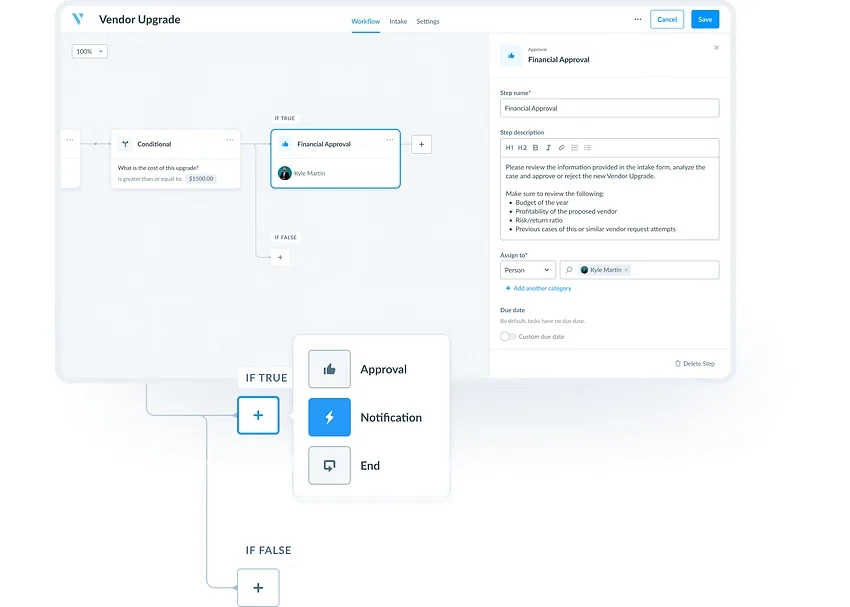
Vendr: image captured from Neuron’s official project account. Credit: Neuron. [Official source ↗](https://www.neuronux.com/vendr). [Open full image](https://bestuxportfolios.com/images/projects/neuron-vendr-capture-1200.webp)
## The problem and context
Vendr is a platform that helps companies find, buy, and manage SaaS software. Neuron describes an embedded design partnership in which it designed features that let Vendr’s customers build workflows to automate internal requests for new software. [Neuron’s original account](https://www.neuronux.com/vendr).
Neuron describes the problem as procurement that is “messy”: internal processes spread across documents, confusing email chains, and loosely defined rules. These lead to delays, or to purchases that miss a team’s needs because key information was siloed. At the same time, Vendr had acquired Blissfully, a SaaS-management platform originally designed for IT, and needed the experience to work for less technical users.
### The constraints
- **Several roles in one process.** Procurement involves people who design the process, people who request software, and people who approve it.
- **Non-technical builders.** The people automating procurement are not developers, but they still need to express conditional logic.
- **One feature in a larger product.** Workflows were one part of Vendr’s wider push into end-to-end SaaS management.
## Design decisions worth examining
### 1. Name the roles, then design for each
Neuron defines three personas: the **Builder**, who designs automations; the **Requester**, any employee who needs new software; and the **Assignee**, who approves or rejects a request based on legal, security, or budget criteria. A request form submitted by a Requester triggers the workflow, Assignees complete approval tasks, and the purchase proceeds if every step is approved. [Neuron’s original account](https://www.neuronux.com/vendr).
**Our reading:** naming roles this precisely gives the team a test for every screen: *whose task is this?* It also keeps the complex builder away from requesters, who should only ever see a simple form.
### 2. Make logic visible as a horizontal flow
Workflows are laid out horizontally along a linear path. Users can branch with conditional logic or run steps in parallel. There are three fundamental step types: approvals, notifications, and conditionals. Users can start from scratch or from a ready-made template. [Neuron’s original account](https://www.neuronux.com/vendr).
**Our reading:** a small vocabulary of three step types is the key choice. It keeps the builder learnable for non-technical users while still covering branching and parallel work. Templates do the rest of the onboarding by showing what a complete workflow looks like.
**What to watch for:** horizontal flows get wide quickly with many branches. The published images do not show how large workflows are navigated or reviewed.
### 3. Configure each step in a side panel
Each step has its own configuration panel, where users assign tasks to people or teams. [Neuron’s original account](https://www.neuronux.com/vendr).
**Our reading:** keeping configuration in a side panel preserves the overview. The builder can adjust one step while still seeing where it sits in the whole process.
## Contribution, outcomes, and evidence
**Documented contribution:** product design for the workflow features (personas, builder, step configuration), as an embedded partner to Vendr’s team. Vendr built the product. This is a contribution to particular features, not sole authorship of Vendr’s platform.
**Outcomes:** the page cites company-level figures about Vendr’s scale and funding. These describe the client, not results of the workflow design, and the page publishes no adoption or efficiency data for the feature itself. The benefits it lists, such as operational efficiency and reduced costs, are intended outcomes rather than measured ones.
**What we did not verify:** we have not used the product. Feature descriptions come from Neuron; “Our reading” passages are our interpretation of its account and images.
## A practical lens
- **Define roles before designing screens.** It prevents the most complex interface from leaking into everyone’s experience.
- **Keep the logic vocabulary small.** Three well-chosen step types can express more than a long menu of options.
- **Lead with templates** so a first-time builder starts from a working example.
**Where this may not transfer:** procurement workflows are mostly linear approval chains. Processes with loops, heavy data transformation, or many integrations usually need a more expressive (and harder to learn) model.
## Original source and editorial responsibility
Source: [Neuron’s original account](https://www.neuronux.com/vendr), checked 16 November 2026. Written by Best UX Portfolios from the agency’s published case study and images. We have not used the product or interviewed Vendr. Spotted an error? [Request a correction](https://bestuxportfolios.com/contact/#corrections).
## Keep exploring
[Neuron portfolio](https://bestuxportfolios.com/portfolios/neuron/)[Request a correction](https://bestuxportfolios.com/contact/#corrections)
## Another perspective on the work.
[All case studies](https://bestuxportfolios.com/case-studies/)
Conversational AI·Enterprise
### [Stardog Voicebox](https://bestuxportfolios.com/case-studies/fuselab-stardog/)
[By Fuselab Creative](https://bestuxportfolios.com/portfolios/fuselab-creative/)
Conversational data workspace, visible source data, and interface/design-system choices.
Dashboard·Healthcare
### [California DHCS](https://bestuxportfolios.com/case-studies/fuselab-dhcs/)
[By Fuselab Creative](https://bestuxportfolios.com/portfolios/fuselab-creative/)
Public-sector healthcare reporting, data visualization, and dashboard organization.
AI workspace·Research
### [Ipsos Facto](https://bestuxportfolios.com/case-studies/goinvo-facto/)
[By GoInvo](https://bestuxportfolios.com/portfolios/goinvo/)
Research workflows, prompts, citations, and AI transparency.